


Posts Tagged ‘snow leopard’
iTunes “now playing” notifications with song title and artist name
When you’re using your Mac and listening to music in iTunes, wouldn’t it be great if a notification popped up to tell you what song is currently playing? Find out how to display the song title, artist name, and even album cover art while using any app! Have you ever watched…


Help Viewer window always floats on top in 10.6 Snow Leopard
Going to the Help menu on a computer running Mac OS X 10.6 Show Leopard will bring up a window that floats above all other open windows. Change Help Viewer’s always-on-top behavior with a simple Terminal command. By default, Mac OS X does not…

How I fixed my Mac’s broken wireless and got back online today
Immediately after upgrading to 10.6.3 last night, my MacBook Pro lost the ability to connect to the internet via WiFi. While a wired connection worked, wireless was apparently ravaged by the latest Mac OS X update. I’m not sure if this is…

Keyboard shortcuts for OS X’s Cmd+Tab Application Switcher
The Mac Application Switcher is that handy list of open programs that comes up when you press Command+Tab on the keyboard. Add more functionality to this feature with a few keyboard shortcuts. For folks coming from…

Batch resize images with Preview in Mac OS X 10.5 and 10.6
Expensive software like Photoshop is not necessary to resize large groups of pictures all at once. Mac OS X’s Preview application gets the job done just as easily for free! Resizing a bunch of images can be a tedious and time consuming…

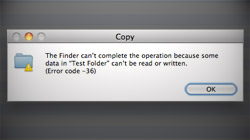
Solution to Finder “Error code -36” in 10.6 when copying folders
Users of Mac OS X Snow Leopard, specifically those running 10.6.2, are experiencing a widespread problem related to copying directories to Windows-formatted volumes in Finder. I recently got a new USB flash drive…
Nifty ways to minimize & un-minimize windows in Snow Leopard
Expanding on some features already in previous versions of Mac OS X and also introducing new ones, 10.6 Snow Leopard offers users more ways to work with minimized windows. As mentioned at the end of MacYourself’s article…

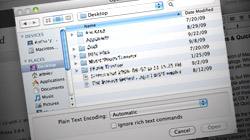
Hidden files & Quick Look in Snow Leopard’s Open/Save dialogs
The latest version of Mac OS X includes a couple important enhancements to Open/Save dialogs. While these mini windows are not quite as full-featured as real Finder windows yet, they’re getting there. I rarely say this, but Windows beats Mac OS X in the…
How holding the Option key unleashes features in QuickTime X
Now that we’ve all had some time to get used to QuickTime X in Mac OS X Snow Leopard, let’s dig a little deeper into the new software. One way to do that is simply to press the Option key. It’s always fun to find little goodies that reveal…

Tweaks & keyboard shortcuts for Stacks in 10.6 Snow Leopard
Stacks are like mini-Finder viewers built right into the Dock. The feature got a few nice improvements in Mac OS X Snow Leopard and, with some shortcuts and customizations, it can be even better. Back in the early days of MacYourself, we published…

Not digging the 3D glass Dock in 10.5 and 10.6? Enable 2D mode
When OS X 10.5 Leopard came out a little under 2 years ago, the Mac community was split between those who loved the new 3D glass shelf Dock and those who despised it. With a quick tweak in Terminal, everyone wins. If eye…

Even more ways to utilize Exposé in OS X 10.6 Snow Leopard
We published an article called “Cool new enhancements to Exposé in Mac OS X Snow Leopard” a couple weeks ago thinking that was all the feature had to offer, but it turns out that’s not the case. There are even more nifty tricks to learn!





- 10 moves Apple made to change the computer industry forever
- 13 surprising quotes that prove Steve Jobs can predict the future
- Solutions for fixing a Mighty Mouse that won’t right-click reliably
- A slew of Exposé tips & tricks to show off to your Windows friends
- Classic Apple Mac commercials that relentlessly bash PCs
- 7 utilities to transfer music & videos from iPod or iPhone to Mac
- Keep your Mac safe from snoopers on public WiFi networks
- iPhone 3-way conference call feature not working? The fix is in!
- Text message fails on iPhone: “Error invalid number” notification
- Handy guide for Time Machine tricks and troubleshooting tips
- My Photo Stream not updating in Mac Photos app?
- Mac running slow after upgrading to OS X 10.10 Yosemite?
- How to delete and forward individual text messages on iOS 7
- How to lock your Mac screen with a keyboard shortcut
- 5 simple ways to secure your Mac
- What Gatekeeper means for users of 10.8 Mountain Lion
- iPhone intermittently loses data connection despite full signal
- How to arrange and sort files in Finder using Mac OS X Lion
- Free Mac Bundle Giveaway! Dropzone, Socialite and Compartments
- iTunes “now playing” notifications with song title and artist name

