


Archive for the ‘Fixes’ Category
My Photo Stream not updating in Mac Photos app?
Apple’s new Photos app for Mac may suddenly stop automatically importing images from your Photo Stream. That means photos from your iPhone and iPad aren’t making their way onto your Mac like you would expect…


Mac running slow after upgrading to OS X 10.10 Yosemite?
Mac OS X Yosemite is a big release – it includes a bunch of new features that help it integrate better with iOS 8 and includes one of the most significant visual redesigns the Mac operating system has seen in years…

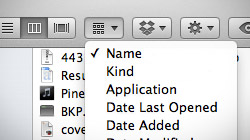
How to arrange and sort files in Finder using Mac OS X Lion
With the introduction of OS X Lion, Apple changed the way file sorting works in Finder. Unfortunately, it has left some users confused as to why selecting Arrange By > Name isn’t working in Finder’s Column view. An interesting issue has been plaguing some…
Finder “Error code 0” when copying large files to external drive
“The operation can’t be completed because an unexpected error occurred (error code 0).” If you received this message when copying files from your Mac to an external hard drive or USB flash drive, there is a simple explanation. Most external hard drives and…

A fix for Apple TV’s “There are no songs in this library” error
Some owners of the new $99 Apple TV have experienced a frustrating issue when sharing content from their computer. They see an error stating “There are no songs in this library,” even though iTunes Home Sharing is set up correctly. Since the recently-introduced…

How I fixed my Mac’s broken wireless and got back online today
Immediately after upgrading to 10.6.3 last night, my MacBook Pro lost the ability to connect to the internet via WiFi. While a wired connection worked, wireless was apparently ravaged by the latest Mac OS X update. I’m not sure if this is…

Shared volumes missing and not mounting in Finder’s sidebar?
Network shares not appearing in Finder’s sidebar is a common issue for some users – especially those running Mac OS X 10.5 Leopard. Sometimes Finder just needs a jump start or a kick in the rear to display those devices correctly. Assuming…

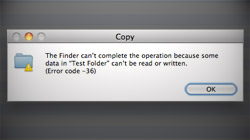
Solution to Finder “Error code -36” in 10.6 when copying folders
Users of Mac OS X Snow Leopard, specifically those running 10.6.2, are experiencing a widespread problem related to copying directories to Windows-formatted volumes in Finder. I recently got a new USB flash drive…
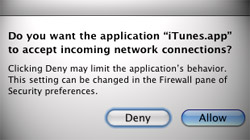
iTunes keeps asking to allow or deny incoming connections
There is a bug that causes some Mac users who have Leopard’s firewall enabled to continuously get popups asking whether “iTunes.app” should accept incoming network connections. When Macs running 10.5 Leopard…
Fix for MacBook Pro 7200rpm hard drive beeps, clicks, & freezes
Owners of Apple’s new unibody MacBook Pro notebooks with 7200rpm hard drives are suffering widespread problems, including beeping, clicking, and freezing. Apple’s still working on an official solution, but there is a way to fix…

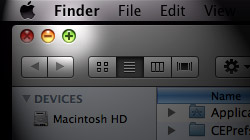
How to resize a window on your Mac’s screen that’s too big to drag
Have you ever come across a window that’s so tall you can’t even get to the resize handle with your mouse cursor because it’s off the screen? There’s a quick and easy fix! The people who usually deal with this problem on a somewhat…
Fix your Mac’s spotty wireless connection after waking from sleep
Occasionally your Mac may decide it doesn’t want to connect to your wireless network via AirPort after you wake it from sleep. Other devices connect fine, so your router’s not the problem… maybe starting over can help. Over the past few…





- 10 moves Apple made to change the computer industry forever
- 13 surprising quotes that prove Steve Jobs can predict the future
- Solutions for fixing a Mighty Mouse that won’t right-click reliably
- A slew of Exposé tips & tricks to show off to your Windows friends
- Classic Apple Mac commercials that relentlessly bash PCs
- 7 utilities to transfer music & videos from iPod or iPhone to Mac
- Keep your Mac safe from snoopers on public WiFi networks
- iPhone 3-way conference call feature not working? The fix is in!
- Text message fails on iPhone: “Error invalid number” notification
- Handy guide for Time Machine tricks and troubleshooting tips
- My Photo Stream not updating in Mac Photos app?
- Mac running slow after upgrading to OS X 10.10 Yosemite?
- How to delete and forward individual text messages on iOS 7
- How to lock your Mac screen with a keyboard shortcut
- 5 simple ways to secure your Mac
- What Gatekeeper means for users of 10.8 Mountain Lion
- iPhone intermittently loses data connection despite full signal
- How to arrange and sort files in Finder using Mac OS X Lion
- Free Mac Bundle Giveaway! Dropzone, Socialite and Compartments
- iTunes “now playing” notifications with song title and artist name

