


Posts Tagged ‘security’
5 simple ways to secure your Mac
Mac OS X is already extremely secure out of the box – especially the latest version, 10.8 Mountain Lion. But that doesn’t mean there aren’t at least a few things you can do to help make your Mac even more safe to use. When it comes to technology…


What Gatekeeper means for users of 10.8 Mountain Lion
As users of 10.8 Mountain Lion settle into their new environment, some of the most common questions about the new operating system relate to Gatekeeper – OS X’s newest security feature. While Gatekeeper is…

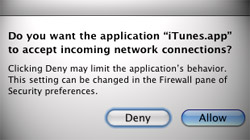
iTunes keeps asking to allow or deny incoming connections
There is a bug that causes some Mac users who have Leopard’s firewall enabled to continuously get popups asking whether “iTunes.app” should accept incoming network connections. When Macs running 10.5 Leopard…
Free Giveaway! Little Snitch, a companion to Mac OS X’s firewall
Mac OS X features its own firewall, which resides in System Preferences. While it is effective, it does not manage all connections to and from a Mac. Little Snitch is a $29.95 third-party firewall that covers everything the built-in one does not. Although…

Keep your Mac safe from snoopers on public WiFi networks
Any time I travel and bring my MacBook Pro along there are a few things I do to keep my personal information safe from hackers. Connecting to public WiFi networks is risky, so knowing how to fend off snoopers is extremely important. Free…





- 10 moves Apple made to change the computer industry forever
- 13 surprising quotes that prove Steve Jobs can predict the future
- Solutions for fixing a Mighty Mouse that won’t right-click reliably
- A slew of Exposé tips & tricks to show off to your Windows friends
- Classic Apple Mac commercials that relentlessly bash PCs
- 7 utilities to transfer music & videos from iPod or iPhone to Mac
- Keep your Mac safe from snoopers on public WiFi networks
- iPhone 3-way conference call feature not working? The fix is in!
- Text message fails on iPhone: “Error invalid number” notification
- Handy guide for Time Machine tricks and troubleshooting tips
- My Photo Stream not updating in Mac Photos app?
- Mac running slow after upgrading to OS X 10.10 Yosemite?
- How to delete and forward individual text messages on iOS 7
- How to lock your Mac screen with a keyboard shortcut
- 5 simple ways to secure your Mac
- What Gatekeeper means for users of 10.8 Mountain Lion
- iPhone intermittently loses data connection despite full signal
- How to arrange and sort files in Finder using Mac OS X Lion
- Free Mac Bundle Giveaway! Dropzone, Socialite and Compartments
- iTunes “now playing” notifications with song title and artist name

