


Archive for the ‘Hardware Tips’ Category
How to format a drive for Mac and PC compatibility
If you have an external hard drive or USB flash drive that you’d like to use on both Macs and Windows PCs, choosing the right file system to format the drive can be confusing. Learn a few ways to make your drive Mac and PC friendly. Need to access or transfer files…


2011 Apple holiday gift guide: 11 Mac hardware accessories
We all have technology geeks in our lives (including ourselves!), which means you can’t go wrong giving gadgets as Christmas gifts. This year, there are a ton of cool and useful hardware accessories that any Mac user would be excited to receive. Despite its 35 year history…

Mac keeps ejecting discs? Don’t replace it quite yet
You insert a CD or DVD into your Mac’s SuperDrive and it spits it right back out at you. You might think you’re in for an expensive optical drive replacement, but there is one last resort that could fix it. A few weeks ago, one of my family members came to…
Check your Mac’s battery health to see if it needs to be replaced
Does your Mac’s battery not last as long as when it was new? Users experiencing noticeably shorter battery life on a MacBook, MacBook Pro, or MacBook Air can take a few steps to determine it’s health and overall condition. It’s completely normal for…

Broken SuperDrive? Enable remote disc sharing on any Mac
If your Mac’s CD/DVD drive is dead, you might not have to get a replacement or external drive. All you need is another Mac or Windows PC on your local network so you can remotely access its drive from your Mac. As one of the few components…

10 holiday gift ideas for 2010: Mac hardware accessories
With just 10 days left till Christmas the clock is ticking fast for procrastinating shoppers. If someone you know has a Mac, one of these 10 hardware accessories will surely be a hit. As a follow-up to our collection of 10 Mac software titles that would make excellent…

Maximum volume still too quiet? Make MacBook speakers louder
A common complaint amongst MacBook, MacBook Air, and MacBook Pro owners is the seemingly low “maximum” volume level of the built-in speakers. It’s frustrating, but there are a few ways to get around it. Although some may blame…

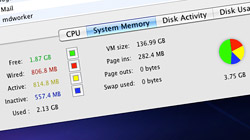
What is free, wired, active, and inactive system memory (RAM)?
Mac users: Have you ever wondered what all that system memory stuff in the Activity Monitor was all about? Understanding the terminology – free, wired, active, and inactive RAM – can help you decide if your Mac has enough memory. A quick…
Enable Magic Mouse momentum scrolling in Mac OS X 10.5.8
Magic Mouse owners who are still running Mac OS X 10.5 Leopard have been left out in the cold. Apple only officially supports momentum scrolling in 10.6, but a simple hack can bring 10.5 users up to speed too. For those of…

Make a bootable USB flash drive to run & repair Mac OS X
Although Macs are reliable machines, they are not exempt from hiccups. All you need to do is carry around a single USB flash drive to be ready for situations the require you to diagnose, repair, or experiment with Mac OS X…
Holiday gift ideas: 9 affordable Mac hardware accessories
‘Tis the season to freak out about gifts and who is getting who what for the holidays. To help ease the stress, we’re launching a weekly shopping guide with gift ideas for the Apple product owner in your life. Nothing shows…

Transform your MacBook’s screen from glossy to anti-glare matte
Apple’s current generation of Macs come with glossy LCD screens, which are much more reflective than the matte screens that preceded them. If you own one of these machines, you can turn glossy into matte one of two ways…





- 10 moves Apple made to change the computer industry forever
- 13 surprising quotes that prove Steve Jobs can predict the future
- Solutions for fixing a Mighty Mouse that won’t right-click reliably
- A slew of Exposé tips & tricks to show off to your Windows friends
- Classic Apple Mac commercials that relentlessly bash PCs
- 7 utilities to transfer music & videos from iPod or iPhone to Mac
- Keep your Mac safe from snoopers on public WiFi networks
- iPhone 3-way conference call feature not working? The fix is in!
- Text message fails on iPhone: “Error invalid number” notification
- Handy guide for Time Machine tricks and troubleshooting tips
- My Photo Stream not updating in Mac Photos app?
- Mac running slow after upgrading to OS X 10.10 Yosemite?
- How to delete and forward individual text messages on iOS 7
- How to lock your Mac screen with a keyboard shortcut
- 5 simple ways to secure your Mac
- What Gatekeeper means for users of 10.8 Mountain Lion
- iPhone intermittently loses data connection despite full signal
- How to arrange and sort files in Finder using Mac OS X Lion
- Free Mac Bundle Giveaway! Dropzone, Socialite and Compartments
- iTunes “now playing” notifications with song title and artist name

