



Subscribe to MacYourself via RSSSubscribe to MacYourself via EmailFollow MacYourself on Twitter
Mini DisplayPort to HDMI adapter
Kanex HDMI Products for Mac

Merge multiple video files using the free version of QuickTime

Merge multiple video files using the free version of QuickTime

If you’ve always wanted a simple way to combine movies into a single file, look no further than QuickTime Player. There’s no need to buy the Pro version — the bundled free version is fully capable of handling the task.

A lot of times when you’re dealing with video you run into a situation where you want to merge a movie file with another but aren’t concerned with things like transitions or titles. Using a video editor like iMovie does the job but it’s far too much effort for something so simple. Luckily, hidden in the standard free version of Apple’s QuickTime Player is the ability to drag & drop video clips together.

To start off, open a video in QuickTime. Now position the program’s playhead where you would like your next video clip to be inserted. It can be at the beginning, anywhere in the middle, or right at the end. Once you have done that, locate your second movie file in Finder. Select the file and drag & drop it right onto the QuickTime window. Playing the whole movie will reveal that the clips have now been combined and are acting as if they were a single video. This trick can be applied with any number of files — you’re not limited to just two.

Here’s where things get kind of tricky. Since only QuickTime Pro has the ability to save movies from the File menu, we don’t have the luxury of using that option here. Instead, you have to close the video. Only then will you be greeted with the option of saving your merged file. Click the Save button and, in the dialog box that comes up, choose “Save as a self-contained movie.” It gets messy if you don’t choose this setting, so make sure you don’t skip it before continuing. Click Save once more and you will have a merged movie created entirely with the free version of QuickTime!
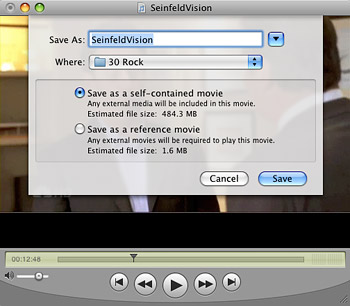
Merge movies for free with QuickTime

One last bit of information for anyone who is curious… you can combine any video format that QuickTime supports (both out-of-the-box and with the help of plugins like Flip4Mac and Perian). So a .mov file can be dragged on top of a .avi file, a .mp4 can be merged with a .wmv, and so on. Varying video resolutions can also be combined, although the smaller file will be anchored to the top-left corner with black filling the rest of the frame. It would be nice if it scaled to fit the larger video’s resolution, but that’s getting picky. Free is free, right?

Share/Save/Bookmark
Share/Save It
Digg ThisStumbleUponDel.icio.usTwitterFacebook

16 Comments Have Been Posted (Leave Your Response)

I already knew this one! I feel smart now, ha ha.

Great article! Wanted to know how to do this. Thanks:)

Every time I do this I lose the audio. Any suggestions or advice would be greatly appreciated.

Aaron,
I’ve never experienced the problem you’re having but maybe we can figure it out. What format are the videos you’re trying to combine?

already knew this one! I feel smart now, ha ha.

is there anyway i can get it as a mp4 format? I made a video for my friends and i want to show it to them.

I just tried doing this. I have the newest version of QT which is 7.6.2

When I click save it simply saves and closes. It doesn’t bring up the window to select save as a self contained version.

It appears to be saving the other way as my original file now shows the combined total time length but the file size is unchanged. As long as I leave the files in their original places it will play as 1 file but if I move any of the files to a different location they will no longer play.

Basically, What version are you guys accomplishing this with?

Thanks

RobbieS,
I tried it again myself and it looks like you’re right. Apple must have broken this hidden “feature” (perhaps it was more of a mistake) with the latest update to QuickTime. Bummer!

This posting saved a project for me. I had four animation clips I needed to string together into one. Such a simple and elegant solution; thanks a million!

So when will we have a Pro version that keeps up with the v10 player in Snow Leopard? Lack of QT Pro is what’s keeping me on the fence about SL.

Gerry,
You can still use QuickTime 7 (including the pro version) with Snow Leopard. Both QuickTime 7 and QuickTime X will live in harmony on the same machine. The app is moved to the Utilities folder though.

Brilliant! This is a lifesaver! :)

I merged Quicktime video files into one, and it plays fine as one big file (total of over 7 minutes, and while I can upload the file onto Youtube or a blog, the playback function only plays a few seconds from the first file (all later merged files won’t playback after uploading). I also noticed the file size didn’t change, and the probably the cause of the playback feature being capped, once uploaded. Anybody know how I can upload a merged file and enable complete playback?

BTW, I’m on a Windows PC.

Thanks! Woeked for me, and allowed me to meet a deadline!

I can’t get this to work. I have Version 10.0 (113) I open the first file, then when I go to drag file #2 on to the player, I get no + sign or any indication I can add the 2nd video to the player. If I release the 2nd file on top of the player, nothing happens. Any help is appreciated.

Ben,
This doesn’t work with QuickTime X. You need QuickTime 7, which you can install from your Snow Leopard disc.

Have Something To Say? Join The Discussion!

  (required)
  (required; will be kept private)
  (optional)