


Posts Tagged ‘os x’
Search for .plist and other system files with Leopard’s Spotlight
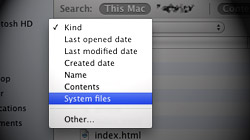
Although Leopard’s Spotlight search function is more powerful than the one found in Tiger, some of that power is hidden. Searching for OS X system files, for instance, can only be done when special parameters are set. Spotlight is configured out of the box to produce…

Navigate Mac OS X dialog boxes using only your keyboard
Recent switchers from the Windows world might get frustrated at the Mac operating system’s apparent anti-keyboard bias when it comes to dialog boxes. The option to Tab through buttons is there – just not by default. Have you ever had a dialog…

iTunes keeps asking to allow or deny incoming connections
There is a bug that causes some Mac users who have Leopard’s firewall enabled to continuously get popups asking whether “iTunes.app” should accept incoming network connections. When Macs running 10.5 Leopard…

Free Giveaway! Little Snitch, a companion to Mac OS X’s firewall
Mac OS X features its own firewall, which resides in System Preferences. While it is effective, it does not manage all connections to and from a Mac. Little Snitch is a $29.95 third-party firewall that covers everything the built-in one does not. Although…

Monolingual: How I recovered 4.5GB of disk space on my Mac
Even a freshly-loaded copy of Mac OS X Leopard can be slimmed down to leave more room for your files and programs. Remove unneeded languages and architectures from your Mac’s hard drive with Monolingual. Veteran Mac users likely…

Fix for MacBook Pro 7200rpm hard drive beeps, clicks, & freezes
Owners of Apple’s new unibody MacBook Pro notebooks with 7200rpm hard drives are suffering widespread problems, including beeping, clicking, and freezing. Apple’s still working on an official solution, but there is a way to fix…

Fixing OS X’s “The disk is in use and could not be ejected” error
When ejecting a volume in Mac OS X, you may be greeted with an error that says the disk is in use. Getting past this occasional annoyance is inconvenient, but not at all painful. Just about every Mac user has seen this error…

Ignore software updates & view previously-installed updates
Is there an item in Software Update that you don’t want to install for some reason? Rather than uncheck it every time you search for updates, make it disappear. While you’re at it, see how to check out all the updates you’ve ever installed…

How to reset your Mac OS X password without an installer disc
Let’s say you totally forgot the password to log on to your Mac. Or maybe you purchased a used Mac from someone else and they’ve got it locked down. There are numerous ways to reset a password with no OS X discs…

Recover forgotten passwords saved to Mac’s Keychain Access
Remembering passwords can be quite the challenge, which is why many people simply let their Macs do the work and save them in Keychain Access. But what if you need to look up that password? Passwords are a pain. Let’s just get that out…

Getting to know iChat, Part 2: Customizing & organizing your IMs
While the first part of “Getting to know iChat” included tips that make instant messaging easier and more functional, the second part focuses on configuring iChat to the user’s preferences. A lot of Mac users tend to set up iChat for accessing their IM account(s)…

Getting to know iChat, Part 1: Productivity and power user tips
Apple’s iChat application is commonly used by Mac owners, but are all of its features truly being taken advantage of? The first part of MacYourself’s “Getting to know iChat” double feature covers techniques that improve the overall iChat experience. Bundled with Mac OS X since 10.3 Panther…





- 10 moves Apple made to change the computer industry forever
- 13 surprising quotes that prove Steve Jobs can predict the future
- Solutions for fixing a Mighty Mouse that won’t right-click reliably
- A slew of Exposé tips & tricks to show off to your Windows friends
- Classic Apple Mac commercials that relentlessly bash PCs
- 7 utilities to transfer music & videos from iPod or iPhone to Mac
- Keep your Mac safe from snoopers on public WiFi networks
- iPhone 3-way conference call feature not working? The fix is in!
- Text message fails on iPhone: “Error invalid number” notification
- Handy guide for Time Machine tricks and troubleshooting tips
- My Photo Stream not updating in Mac Photos app?
- Mac running slow after upgrading to OS X 10.10 Yosemite?
- How to delete and forward individual text messages on iOS 7
- How to lock your Mac screen with a keyboard shortcut
- 5 simple ways to secure your Mac
- What Gatekeeper means for users of 10.8 Mountain Lion
- iPhone intermittently loses data connection despite full signal
- How to arrange and sort files in Finder using Mac OS X Lion
- Free Mac Bundle Giveaway! Dropzone, Socialite and Compartments
- iTunes “now playing” notifications with song title and artist name

